User guide, version 0.21.19

NC2 Dash

A custom instrument display for one 2010 Mazda MX-5 Miata, running on its Android head unit. It reads the car's computers directly and shows gauges, road information and a long-term record of the car's health.

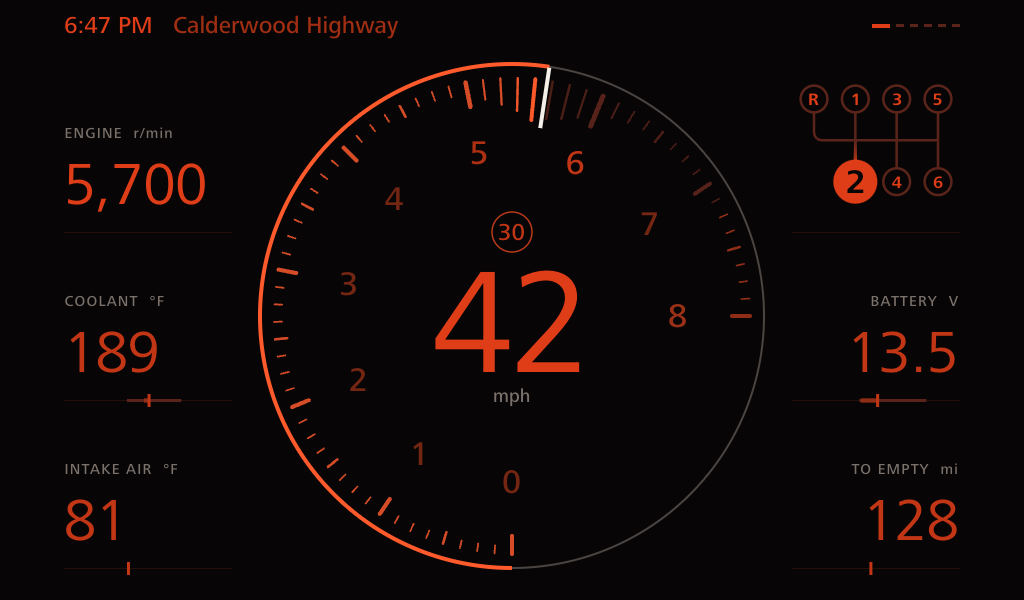
Drive through a real pull in second, warming into night mode on the way to 6,800 rpm, replayed from the car's own log.

The app works alongside the factory cluster instead of copying it. The cluster's printed gauges can only show now, so this display adds what print can't do: scales that respond to the car, and a memory of how it has been running.

Car
2010 Grand Touring, 2.0 L, 6-speed, stock
Head unit
Eonon UX6S2, Android 13, 1024 × 600
Adapter
Vgate vLinker FS, USB
Reads
102 values from 81 requests

In motion

Nothing on the screen moves unless the car does. Each clip is a real logged drive replayed through the app, recorded straight from the display.

Drive: a launch from a stop, first into second. Ticks swell around the revs and glow briefly after they pass.
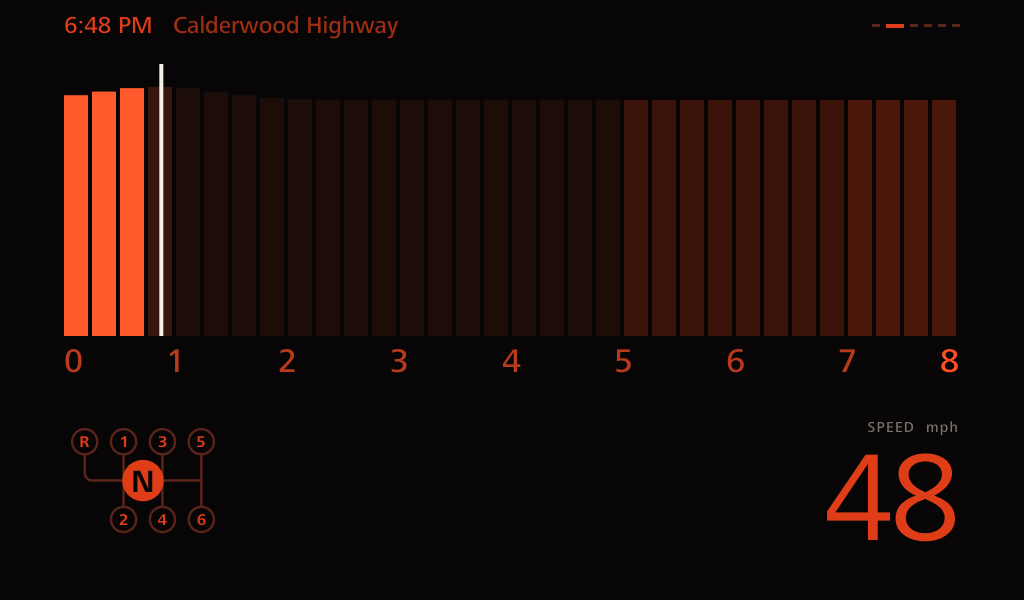
Tach: the bar reads from the corner of your eye, with a trail where the revs have just been.
Gear: a light travels the gate as you change gear.
Road along US 129 at Deals Gap, the curviest road in the app's scale.
Over-rev: with the clutch in, a copper mark shows any lower gear that would land in the red.

How it connects

The carEngine, cluster and ABS computers on one CAN bus
AdapterUSB OBD-II, plugged into the head unit
AppAbout 96 requests a second
Home Wi-FiWhen parked in range
Home serverLogs go up, updates come down

The app also uses the head unit's GPS and an offline road map stored on it. It needs no phone or internet connection, so it keeps working behind CarPlay and out of cell range.

Getting around

  • Swipe moves through the six driving pages in a loop, so Logo leads back to Drive.
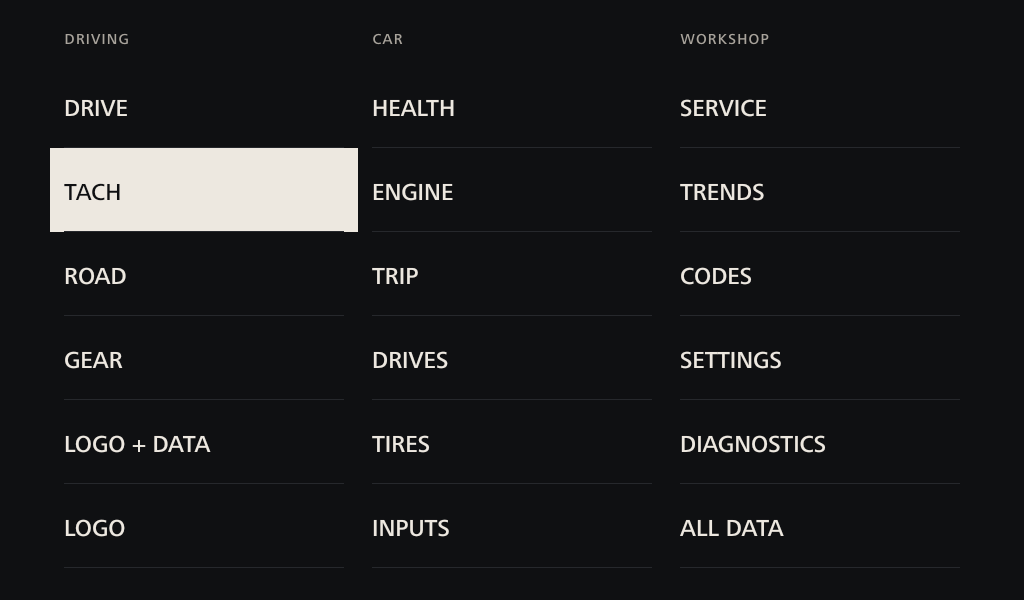
  • Tap the top right corner on any page to open the menu, including pages that show nothing there.
  • Tap the middle of a driving page to switch night mode by hand.
  • Tap the top center logo to change it, or turn it off. Tach and the logo pages have their own choice.
  • The app opens by itself when the adapter connects, and reopens on your last page.
  • Readings with no data show a dash, never a false zero.
Full-screen menu with three columns: Driving, Car and Workshop.

Driving pages

Read at a glance, one question each

Banners for critical warnings appear on Drive, Tach and Road.

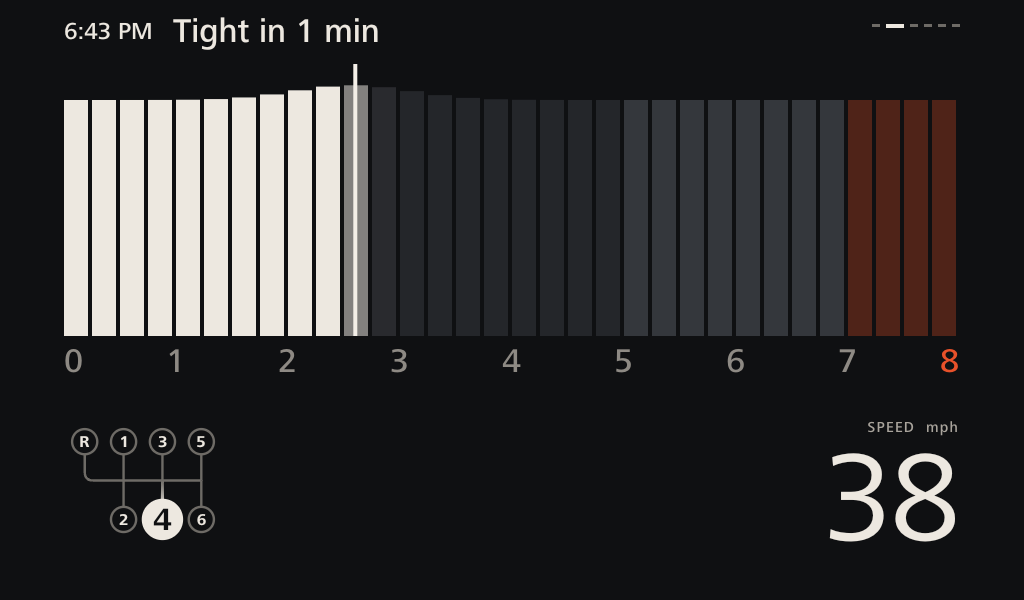
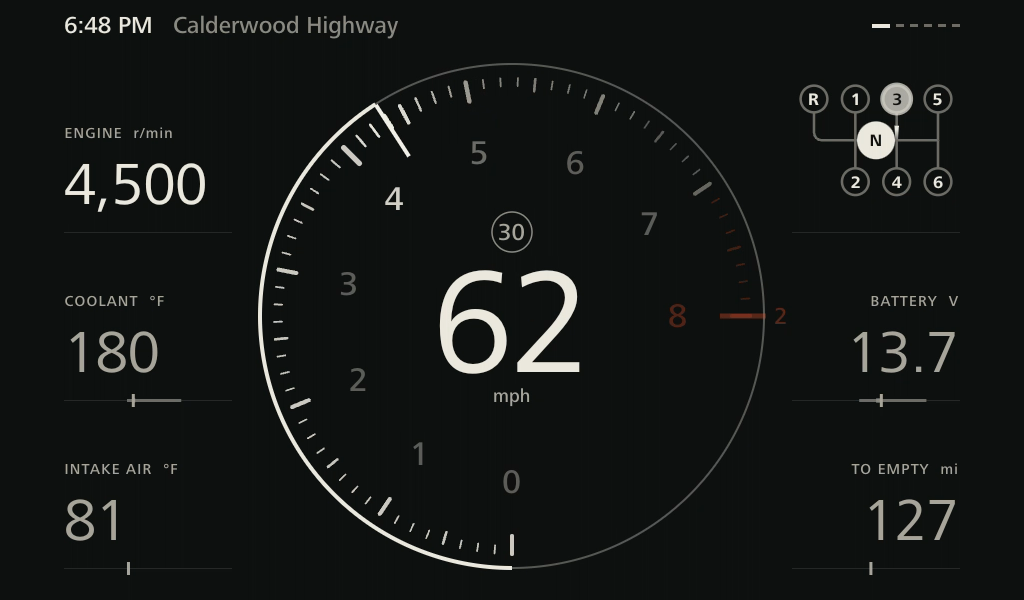
Drive page at 39 mph in fourth gear with a 30 mph limit above the speed.

Drive

How is the car doing right now?

  • The dial uses the cluster's scale, with 0 at 6 o'clock and 8 at 3 o'clock.
  • Ticks swell around the revs, and swell more with throttle. Passed ticks glow briefly after the revs fall.
  • The red zone stays dim until the revs come near it, and follows engine temperature: 4,500 rpm cold, rising to 7,200 when warm.
  • The current road's limit sits above the speed, only when the map has one.
  • Speed and revs are steadied so the digits don't flicker.
  • Revs, coolant and intake air on the left. Gear, battery and miles to empty on the right.
ReadsRevsSpeedThrottleClutchCoolantIntake airVoltageFuel levelMap
Drive page with the clutch in at 64 mph, and a copper mark at the end of the dial labelled 2.

Over-rev warning

Would this downshift land in the red?

  • With the clutch in, a copper mark appears for any lower gear that would put the revs past the red line, numbered with that gear.
  • Shown on Drive and Tach. The marks disappear when you lift off the clutch.
  • It's the only shift aid in the app. The owner shifts by feel, so there are no shift lights or rev-match targets.
ReadsClutch switchSpeedGear ratios
Tach page at 6,000 rpm in third gear and 64 mph.

Tach

Where am I in the revs?

  • A tall bar made to read from the corner of your eye.
  • Lighter segments mark the power band, 5,000 to 7,000 rpm.
  • Segments stand taller around the revs, and a fading trail shows where the revs have just been.
  • Shift plate on the left, speed on the right, and a logo of your choice between them.
ReadsRevsSpeedThrottleClutch
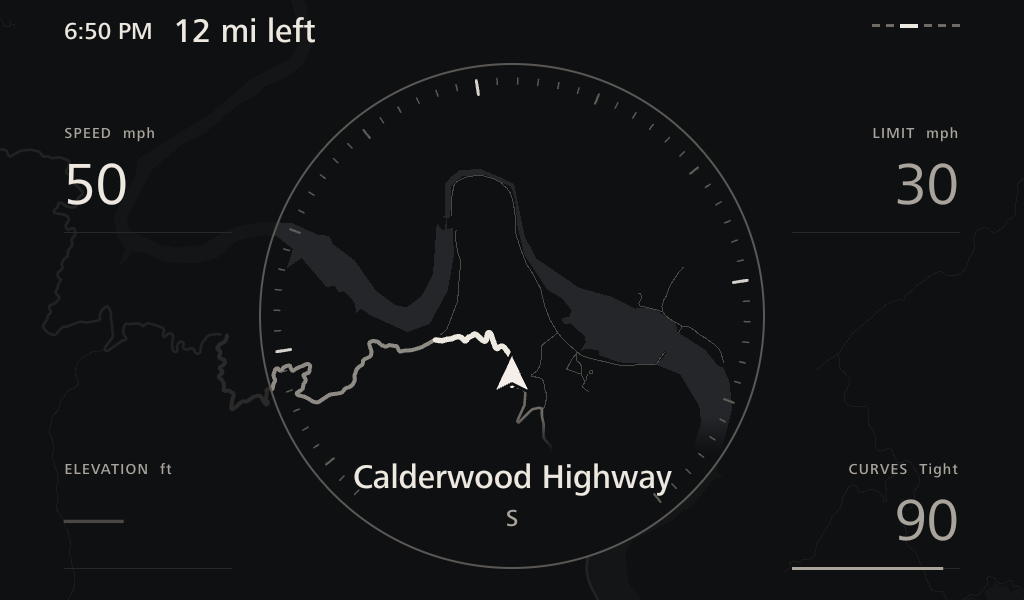
Road page near Deals Gap on Calderwood Highway, with a curvy road ahead, a 30 mph limit and a Tight in 1 min message.

Road

Where am I, and what's this road like?

  • A live line map, lit inside the same ring as Drive's dial and almost black outside it. The road ahead is drawn brighter.
  • Street, town, limit and elevation, with a small line showing the climb so far.
  • Curves score: 0 to 100, from road geometry, with Deals Gap on US 129 set to 100.
  • "Tight in 1 min": said once before a curvy stretch on roads you don't know yet, then miles left.
  • The map covers the 48 contiguous states and works offline. CarPlay still handles directions.
  • If GPS drops, street and limit clear after 10 seconds, so a limit is never held from the last road.
ReadsGPSOpenStreetMapSpeed
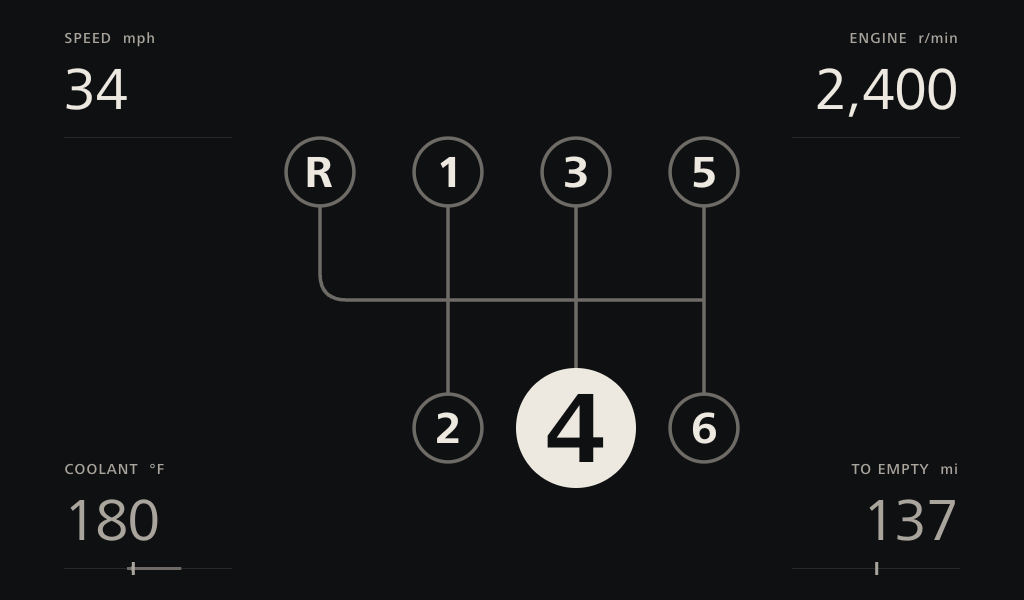
Gear page showing third gear on a large shift plate, with speed, revs, coolant and miles to empty in the corners.

Gear

What gear am I in?

  • The shift plate large, laid out like the real shifter. A light travels the gate as you change gear.
  • Speed, revs, coolant and miles to empty in the corners.
  • The car has no gear sensor, so gear comes from comparing revs with speed. The clutch and neutral switches stop it flickering through a shift.
ReadsRevsSpeedClutch switchNeutral switch

Logo + Data

A logo with speed, gear, coolant and miles to empty in the corners, for when you want the screen to look like part of the car.

Logo

Just a logo, for parked moments. Tap it to change it. It can return to your last driving page when you pull away.

Car pages

For a stop or a passenger

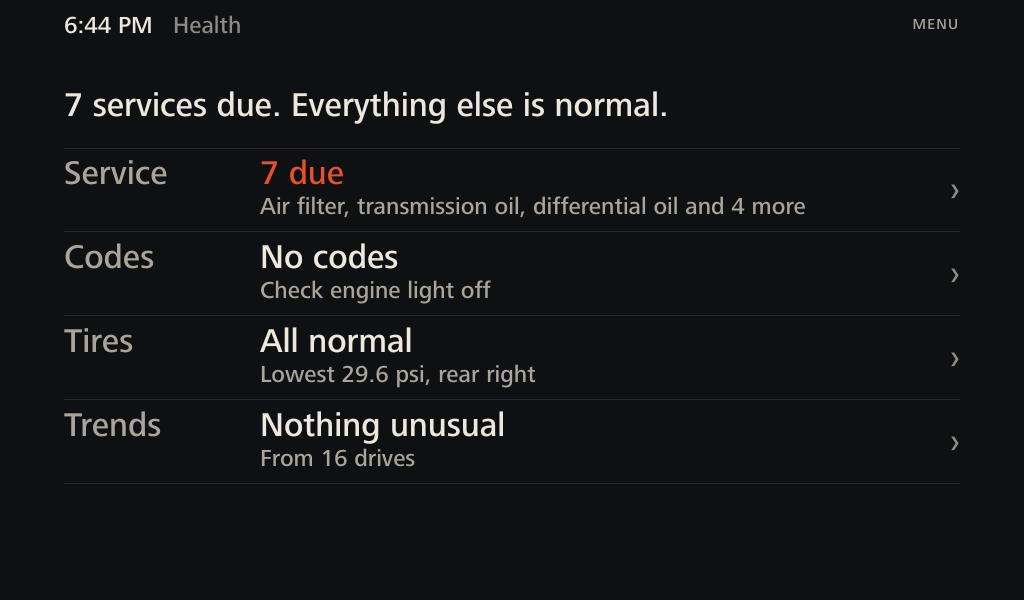
Health page: services due, everything else normal, with rows for service, codes, tires and trends.

Health

Is my car okay?

  • One sentence, then a row each for service, codes, tires and trends.
  • Tap a row to go to its detail page.
ReadsService recordsTrouble codesTire sensorsDrive history
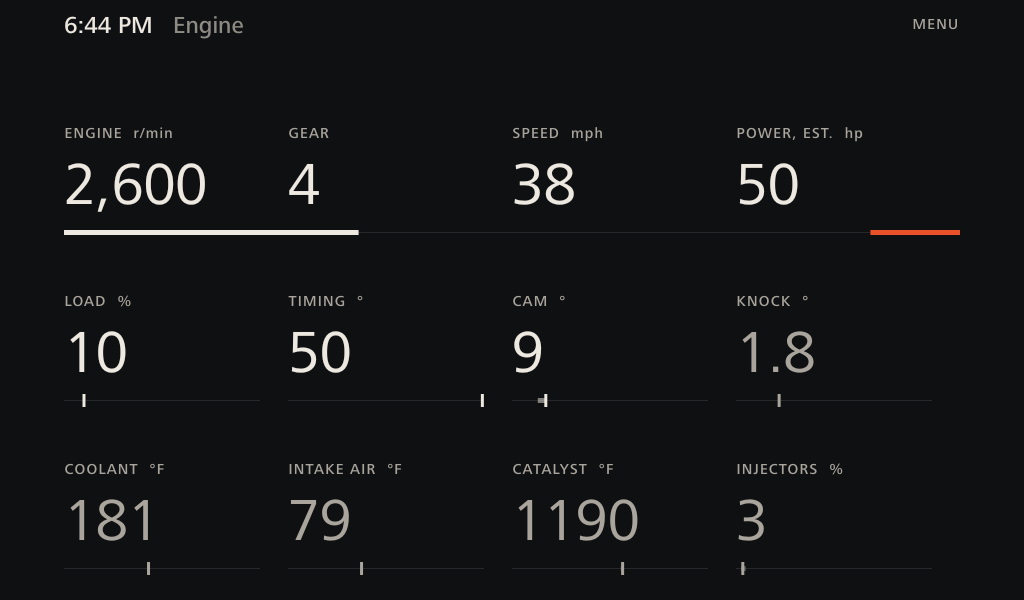
Engine page with twelve readings.

Engine

What's the engine doing?

  • Twelve readings. The line under the top row is a rev bar with the red zone at its end.
  • Each lower reading's line is a gauge, with a faint band showing where the value has been lately.
  • Knock holds its highest value for a minute and turns copper at 4° or if the engine computer drops into its safer timing mode.
  • Power is an estimate from airflow.
ReadsLoadTimingCam angleKnockAirflowCatalyst tempInjector pulse
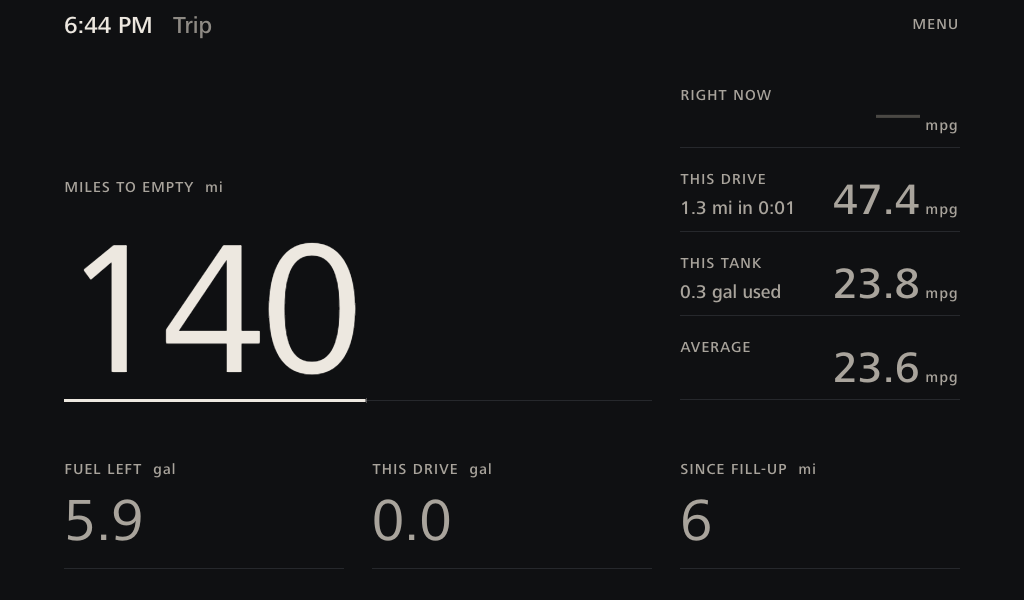
Trip page with 140 miles to empty and fuel economy figures.

Trip

How far can I go?

  • Miles to empty, gallons left, and gallons used this drive.
  • Fuel economy now, this drive, this tank and on average. This Drive shows miles and time, like "9.8 mi in 0:24".
  • Fuel used comes from airflow, and overrun fuel cut counts as zero.
  • The fuel sender never reads above 91%, which is a tank filled to the first click, so the bar counts 91 as full. Gallons keep the raw reading, which matched the pump.
  • The sender sloshes on the road, so the level is a five-minute median.
ReadsAirflowAir-fuel ratioInjector pulseFuel levelSpeed
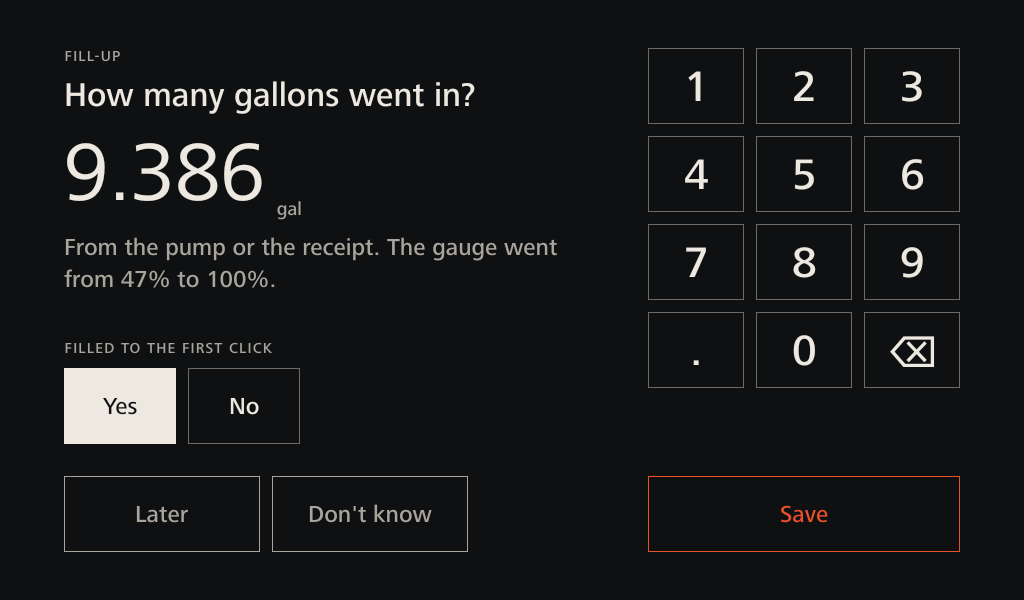
The fill-up question: how many gallons went in, with a large keypad, a filled-to-the-first-click choice, and Later, Don't know and Save buttons.

The fill-up question

How many gallons went in?

  • Standing at the pump, the app spots a fill-up about 8 seconds after the engine starts and asks while the pump's display is in front of you.
  • It only asks before the car first moves, so a red light can't pop it open. Later keeps it for the next start, for a week.
  • Its own large keypad takes only a pump-shaped number from 0.5 to 13 gallons. A number far from what the gauge rose needs Save twice.
  • Two fills to the first click give the app's own gallons against the pump's, the check that will correct fuel economy and range.
  • Unanswered, Trip's Since fill-up turns copper. Tap it when stopped to answer or correct.
ReadsFuel levelSpeedEngine running
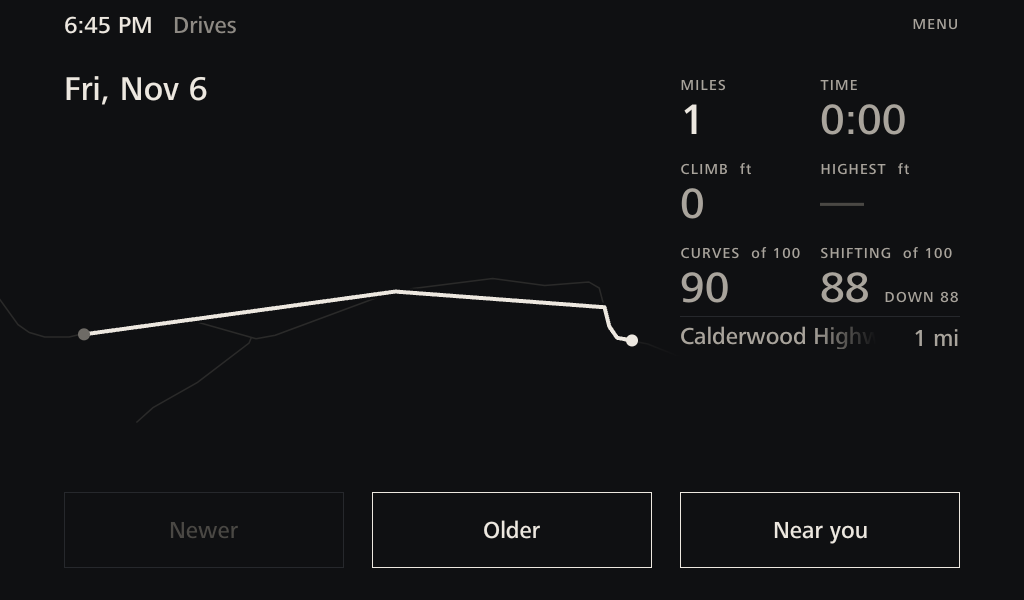
Drives page with a route on a faint map and stats for miles, time, curves and shifting.

Drives

What was that drive like?

  • Each drive's route draws itself onto the map, with miles, time, climb, highest point, curves and the roads driven.
  • Shifting score: how closely the revs matched the next gear, out of 100, split into up and down. Within 50 rpm is perfect, and 800 off scores nothing. It's an estimate for comparing drives, and never gives advice while driving.
  • Near You: the best roads within 100 miles, and whether you've driven them.
ReadsGPSOpenStreetMapRevsClutch switchThrottle
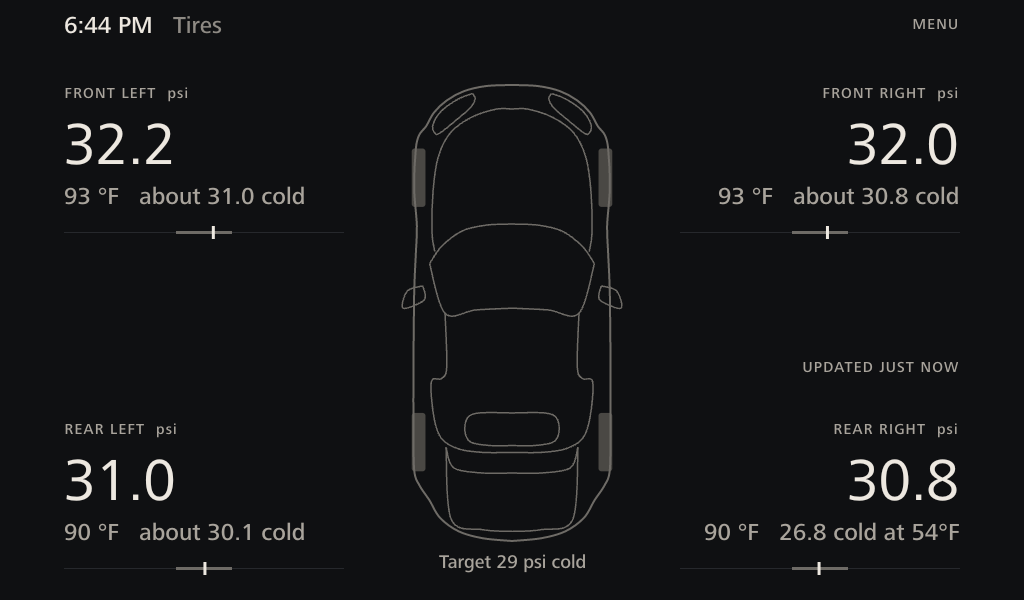
Tires page with four pressures around a top-down car.

Tires

Are my tires okay?

  • Pressure and temperature at each corner, from the car's own sensors. A low tire lights its wheel.
  • After a cold start, each corner shows a real reading like "28.4 cold at 57°F". This is the number to set pressures by.
  • Otherwise it shows an estimate worked back from the warm tire.
  • Sensors only transmit above about 16 mph. Until then the cluster repeats the last drive, and the line under the car says so.
  • To swap readings between corners, stop, then tap one tire and the tire to swap with.
ReadsTire pressuresTire tempsAir tempSpeed
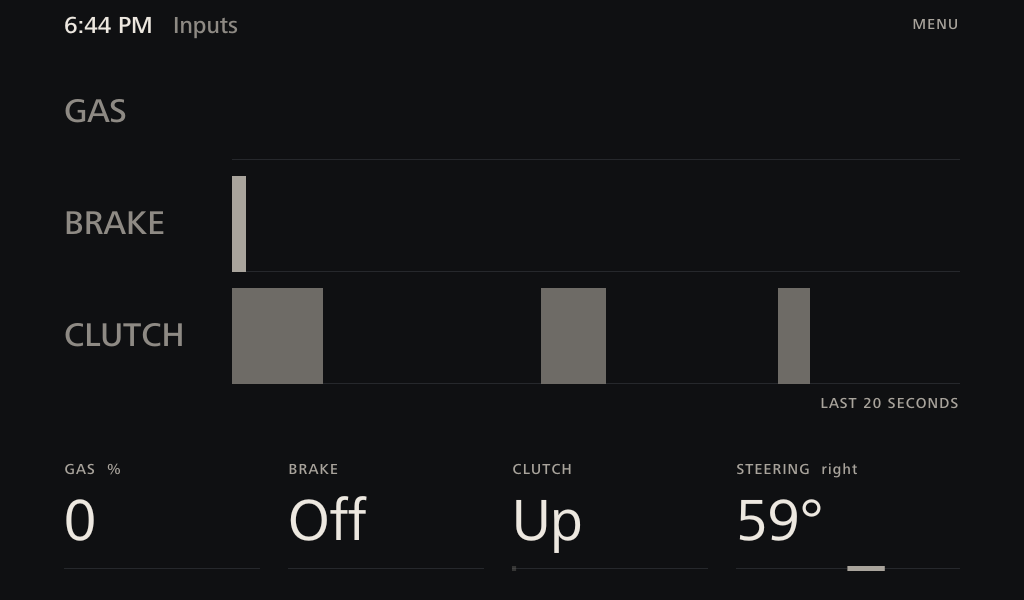
Inputs page with gas, brake and clutch ribbons, and steering angle.

Inputs

What have my hands and feet been doing?

  • Ribbons showing gas, brake and clutch over the last 20 seconds, recorded while the page is open.
  • Gas percentage, brake, clutch and steering angle below.
ReadsGas pedalBrake switchClutch switchSteering angle

Workshop pages

Looking after the car over time

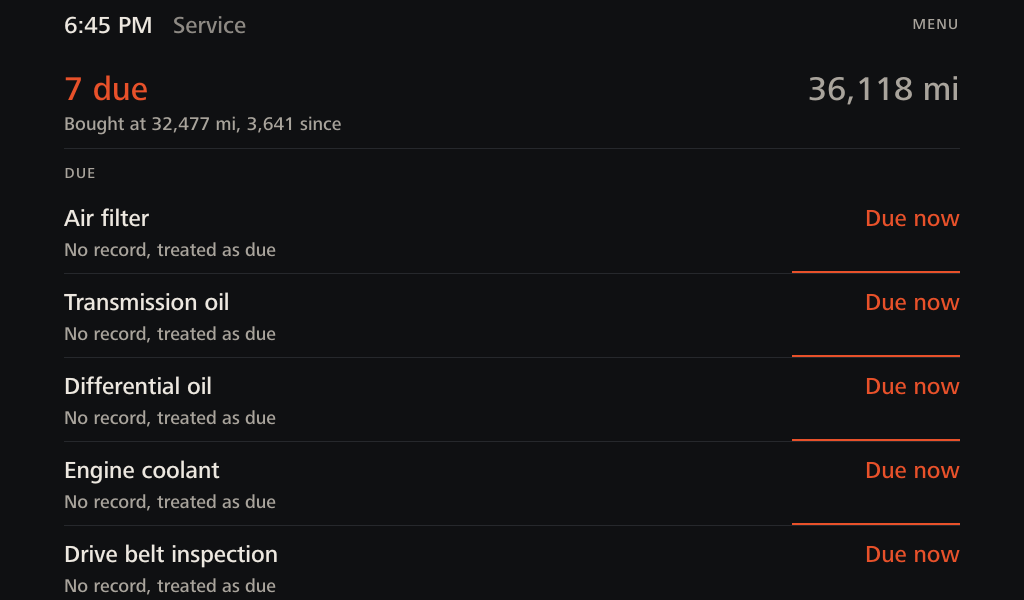
Service page listing due items and miles since purchase.

Service

What does the car need?

  • Due and Coming up, with lines that fill as each job ages, by miles or time.
  • Follows Mazda's Schedule 2, adjusted for how this car is maintained: oil at 5,000 miles or a year, brake and clutch fluid every two years, plus drive belt, chassis and hardtop drains.
  • Jobs with no record count as due until you mark them done.
  • Tap a job to see its spec and mark it done.
  • The car doesn't report its odometer, so you enter it once and the app counts on from there.
ReadsOwner's recordsMiles counted
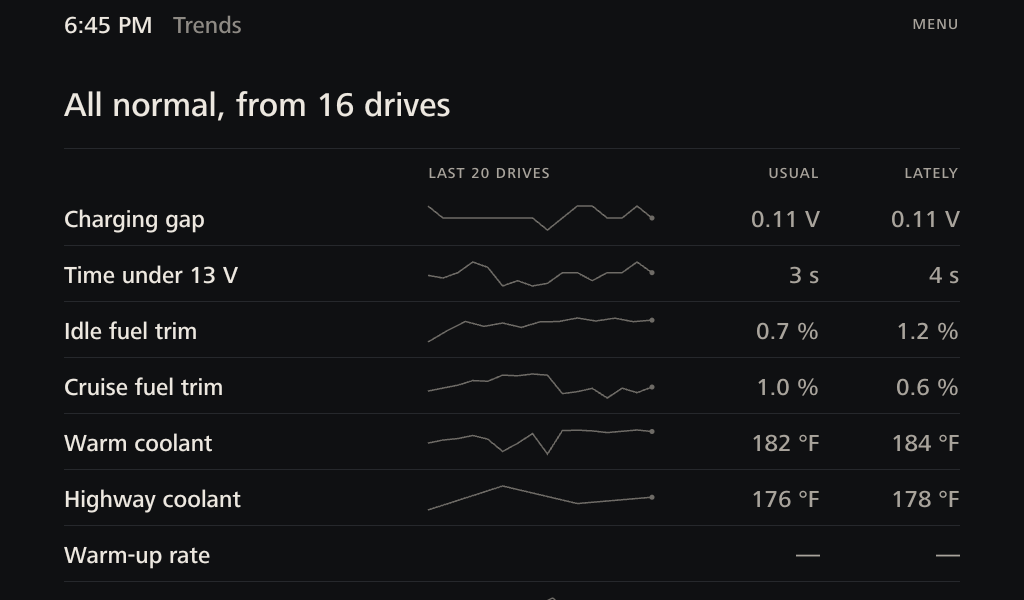
Trends page comparing usual and recent values across drives.

Trends

Is anything changing?

  • Every drive adds a line of measurements. The last three are compared with the car's earlier ones, so one odd drive can't raise a flag.
  • Starts flagging after six drives. Flagged rows move to the top.
  • Watches: charging gap, time under 13 V, idle and cruise fuel trim, warm and highway coolant, warm-up rate, fuel economy, shifting, knock under load, clutch slip, peak airflow, high detonation mode and each tire.
  • Warm-up rate and fuel economy only compare drives that started within 15°F of each other, so winter can't look like a failing thermostat.
  • Each tire is judged against the other three, so a cold snap doesn't look like a leak. Adding air restarts the comparison, and a tire left low stays flagged.
  • Clutch slip compares revs against speed under firm and light throttle in the same gear. A healthy clutch reads under 1%.
ReadsDrive history
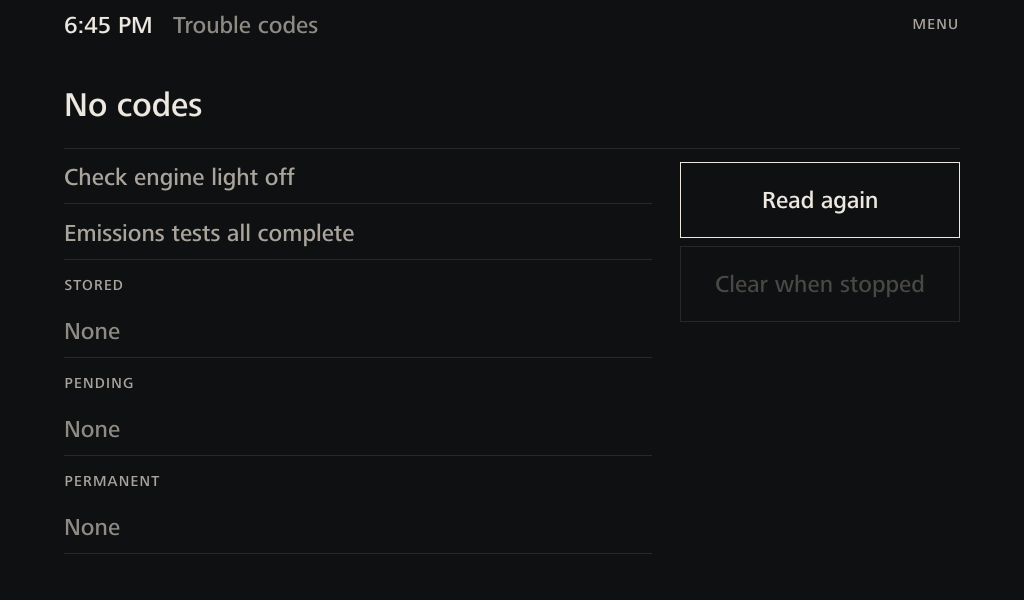
Trouble codes page showing no codes and emissions tests complete.

Codes

Has the car flagged anything?

  • Stored, pending and permanent codes, the check engine light, and whether emissions tests have finished.
  • All 122 codes this car can set have plain names, from Mazda's list.
  • A history keeps each code with what the car was doing when it was stored.
  • Clearing codes asks for confirmation first.
ReadsModes 03, 07, 0AFreeze frame
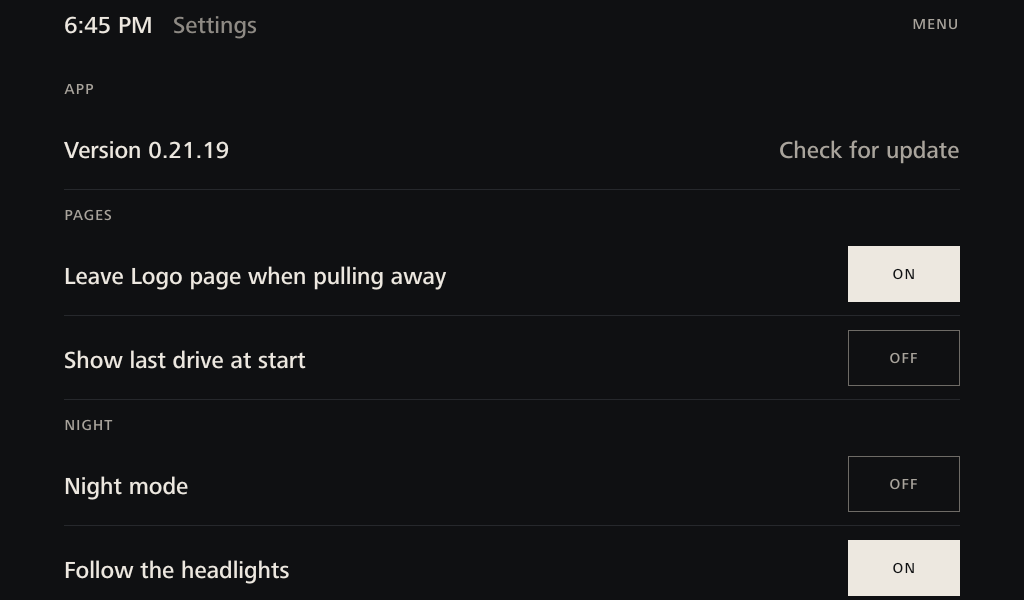
Settings page with the app version at the top.

Settings

App version and updates at the top, then pages, night mode, map options, home server and data. Choices stay after a restart.

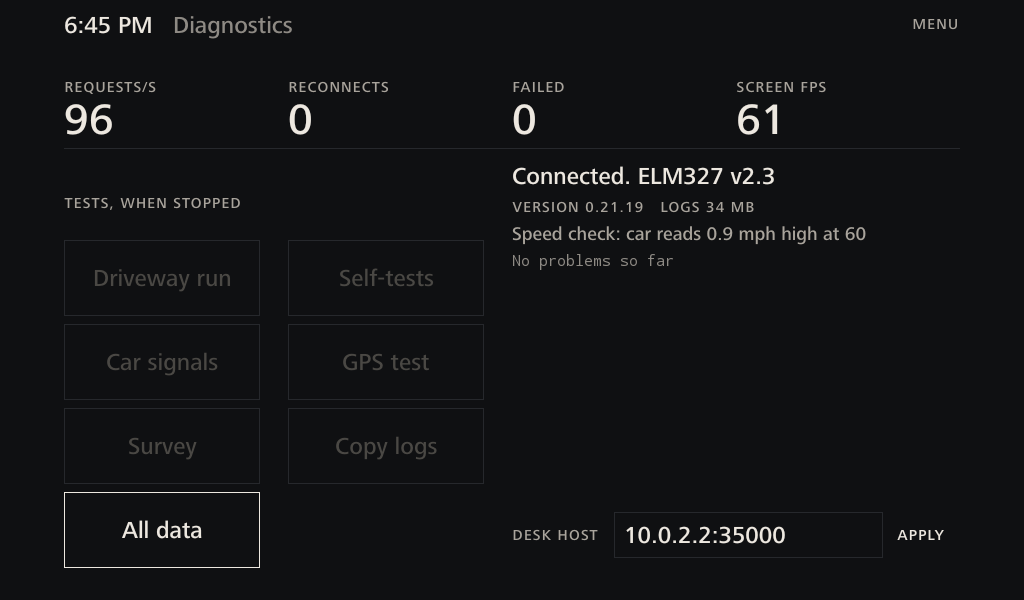
Diagnostics page with connection stats and test buttons.

Diagnostics

Connection stats, then read-only tests that wait until you've stopped: Driveway run, Self-tests, Car signals, GPS test and Survey. None can change anything on the car.

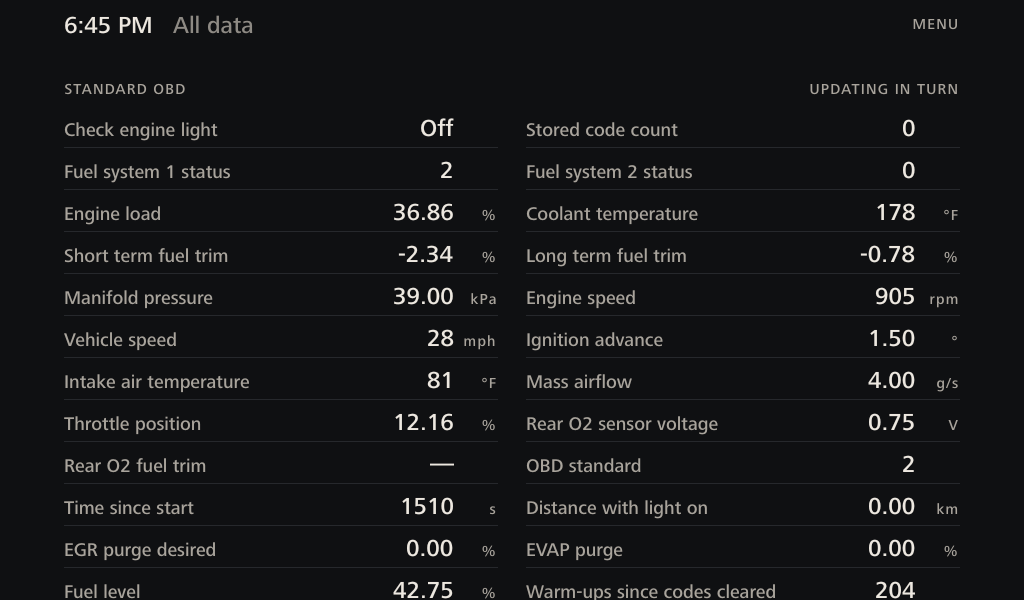
All Data page listing raw values.

All Data

Every value the app can read, in plain names. It sweeps quickly while open, which slows the gauges, so the app won't reopen here.

Warnings

Normal readings stay quiet, so anything bright means something. Critical warnings appear as a banner on Drive, Tach and Road, and as a copper line around the screen on every other page.

BannerWhenSource of the limit
ENGINE OVERHEATINGCoolant at 234°F or moreMazda service data, 2008, same cooling specs as 2010
CHARGING FAULTUnder 13.0 or over 15.0 V for 15 seconds, or the charging light is onMazda generator spec, with the hold time from this car's drives
LOW TIRE PRESSUREAny tire under 24 psi, judged cold, once readings are liveSet below Mazda's 29 psi target

Night mode

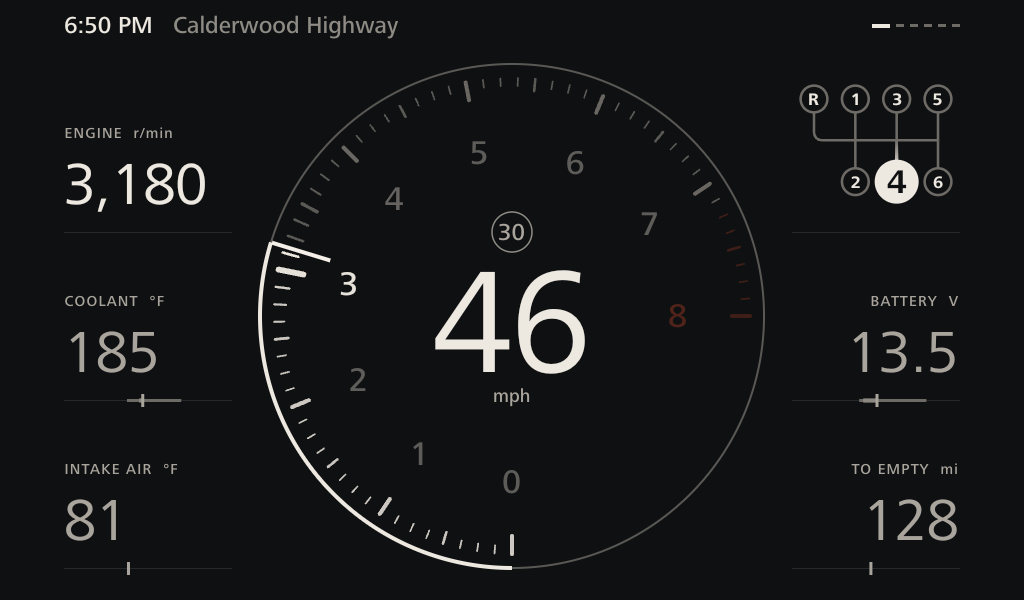
The display follows the headlights, read from the head unit, and fades from white to the cluster's red over about a second, like a warming bulb. The needle stays white, and warnings turn amber. It dims this app only, and a tap overrides it until the lights next change.

Drive page in red night mode.
Tach page in red night mode.

Home server

When the car is parked in range of home Wi-Fi, the app connects to a private share on the owner's server. It works in the background and waits while the car is moving.

  • Logs go up by themselves, newest first. The app tries the moment the head unit joins Wi-Fi, then every 30 seconds while in range. Transcripts are zipped to about a fifth of their size.
  • A transfer cut short starts that file again next time. Nothing is deleted from the head unit, which keeps up to 2 GB.
  • Updates come down the same way, over home Wi-Fi with no cable or USB stick. The app checks the version and signature, then shows UPDATE READY. You tap Install in Settings when parked, and it restarts in a few seconds.
  • GPS logs hold real locations, so they only upload if you turn that on.
LogWhat's in it
transcriptEvery request to the car and every reply, timed to the millisecond
eventsApp version, connections, fill-ups, service done, new codes
healthConnection, frame rate, revs, speed, gear and page, every 10 seconds
drive-historyOne line per drive, the data behind Trends
car-stateService book, odometer, trip totals, tire labels, codes and fill-ups, for the desk dashboard
gps-routesEach drive's simplified route, for the desk dashboard
gpsPosition, speed, heading and altitude once a second, kept separate

The look

Charcoal ground, warm white for what's true now, copper for warnings and actions. It's designed to sit beside the cluster without copying it.

  • A humanist typeface in Regular, Medium and Bold, chosen after an audition of eight faces for its open shapes and taller lowercase, which hold up in glare.
  • Weight follows size. Text up to 44 px is Medium and figures from 60 px are Regular, so stroke thickness climbs steadily from 0.23 to 2.1 mm and every page reads as one voice.
  • Read while moving means at least 34 px, about 16 arcminutes from the seat, the legibility floor for in-car text. Small capitals are for labels only, and sentences start at 19 px.
  • Every line knows what to do when it runs long. Headlines step down a size, names fade at the edge, sentences wrap, and numbers always stay whole.
  • Motion only comes from the car. A still car means a still screen.

Data streams

Polling runs 25 cycles a second. Each cycle reads the fast channels and one rotating slot, so more important values come round more often.

StreamWhat it givesHow oftenHow we know how to read it
Standard OBD-IIRevs, speed, throttle25 a secondMode 01, the public OBD-II standard
AirflowAbout 3 a secondMode 01
Coolant, intake air, voltage, fuel level, fuel trimAbout once a secondMode 01. Fuel level confirmed raw on the road
Mazda engine computerClutch, brake and neutral switchesAbout 6 a secondMode 22, from Speeps' sheet and OBDb. Bit positions proven on this car
Knock, injector pulse, charging target, detonation mode, A/CAbout once a secondMode 22, from Speeps' sheet and OBDb
Everything else, such as cam, rear oxygen sensor and fansAbout every 25 secondsSame sources. Faster on the page that shows them
Instrument clusterFour tire pressures and temperaturesAbout once a secondAddresses from OBDb recordings and miata.net
ABS computerSteering angleOn Inputs, about 6 a secondmiata.net and RaceChrono forum members
Head unitGPS, headlight stateOnce a second, and on changeFound with the app's own Survey and Car signals tests
Road mapStreets, limits, towns, water, curvesOfflineOpenStreetMap, packed into 49 files, 370 MB
Worked out in the appGear, power estimate, economy, range, cold tire estimate, shifting scoreLiveMazda's ratios and this car's logged drives

Where limits come from

Every limit traces to a source, used in this order. Mazda changed the engine tuning for 2009, so no 2008 tuning figure is used anywhere in the app.

  • This car's logged drives: gear ratios, the 15-second charging hold, and baselines for charging, coolant and airflow.
  • Mazda, 2010: thermostat 176 to 183°F, 29 psi tires, tank size, premium fuel, service schedule and all 122 codes.
  • Mazda, 2008: overheat and charging limits, on hardware the 2010 documents show unchanged.
  • NC owners: knock at 4°, fuel trim limits, peak airflow and fan on-points.
  • Common specs: 7,200 rpm redline, 7,500 fuel cut and the 167 hp rating.

Real logged drives are replayed through the app's logic by 224 automated tests, so a change that would break gear detection or raise a false warning fails before it reaches the car.

What it can't do

  • This engine reports no oil temperature or pressure, so the app doesn't show them.
  • The car doesn't report reverse or its odometer.
  • Warnings only show inside the app, so the car's own warning lights still matter.
  • Power and fuel economy are calculated. Economy is being checked against the pump through the fill-up question.
  • OpenStreetMap limits can be missing or out of date, so a limit is shown but never used to warn you.
  • It knows what the car's computers know. It can't hear noises or see brakes, suspension or exhaust.

Credits

This project stands on work the Miata community shared freely.

Speeps

Reverse-engineered the NC's extended data and published the NC_MX5_OBD_PIDS sheet. Most of what this app reads from the engine computer starts there.

miata.net members

The "Mother of All" Torque Pro Mode 22 PID file thread, for clutch, steering and tire pressure findings. Owners' logged numbers on coolant range, knock retard, airflow baselines, fuel trim, charging voltage and idle speed shaped what the app calls normal.

OBDb contributors

The Mazda-MX-5 signal set, with recorded responses from real 2009 to 2011 cars. It's used as a test fixture here.

RaceChrono forum members

Corrections to the NC pedal and steering formulas.

MX-5 Owners Club and Grassroots Motorsports

Thermostat experience from the MX5OC forum, and NC buying advice on expansion tanks.

Mazda

The 2010 owner's manual, the 2011 Service Highlights with its 2010 column, and 2008 workshop manuals.

OpenStreetMap contributors

All road, limit, town and water data. © OpenStreetMap contributors, ODbL.

Open source

usb-serial-for-android by mik3y, for the adapter. smbj by hierynomus, for the home server. ELM327-emulator by Ircama, for desk testing. Barlow by Jeremy Tribby, the app's typeface until 0.21.16, and Source Sans 3 by Paul D. Hunt, this page's fallback, both under the SIL Open Font License.